Build and Install Your OpenClaw Agent in One Guided Run
Answer a few questions, then Lattice creates your secure workspace and gives you a double-click Windows installer or one copy-and-paste command for Mac and Linux. It installs OpenClaw, applies your configuration, and checks that the setup works.
Preview free. Pay $29 only when you are ready to download and run it.
Windows
Double-click installer
Download the installer and double-click it. There are no terminal commands to type; the guided window installs OpenClaw and walks you through the steps that need your input.
Mac + Linux
One command
Copy one personalized command from Lattice and paste it into Terminal. Plain-English instructions show exactly how to open Terminal, run the command, and complete official OpenClaw setup.
What the guided run does
1Installs OpenClaw
2Opens official onboarding
3Applies your secure workspace
4Runs doctor + security checks
You enter your own credentials during official OpenClaw onboarding. Hosting, API/model usage, custom integrations, and ongoing agent operation are not included.
Updated for OpenClaw v2026.9.9Stable release published October 8, 2026
Lattice checks the upstream OpenClaw release feed every day, stamps this stable baseline into every bundle, and flags newer prereleases as review-required instead of silently enabling beta-only behavior. Latest prerelease detected: v2026.10.1-beta.2.
A guided OpenClaw install plus the complete, security-hardened workspace built for your use case.
Complete Agent Config Files
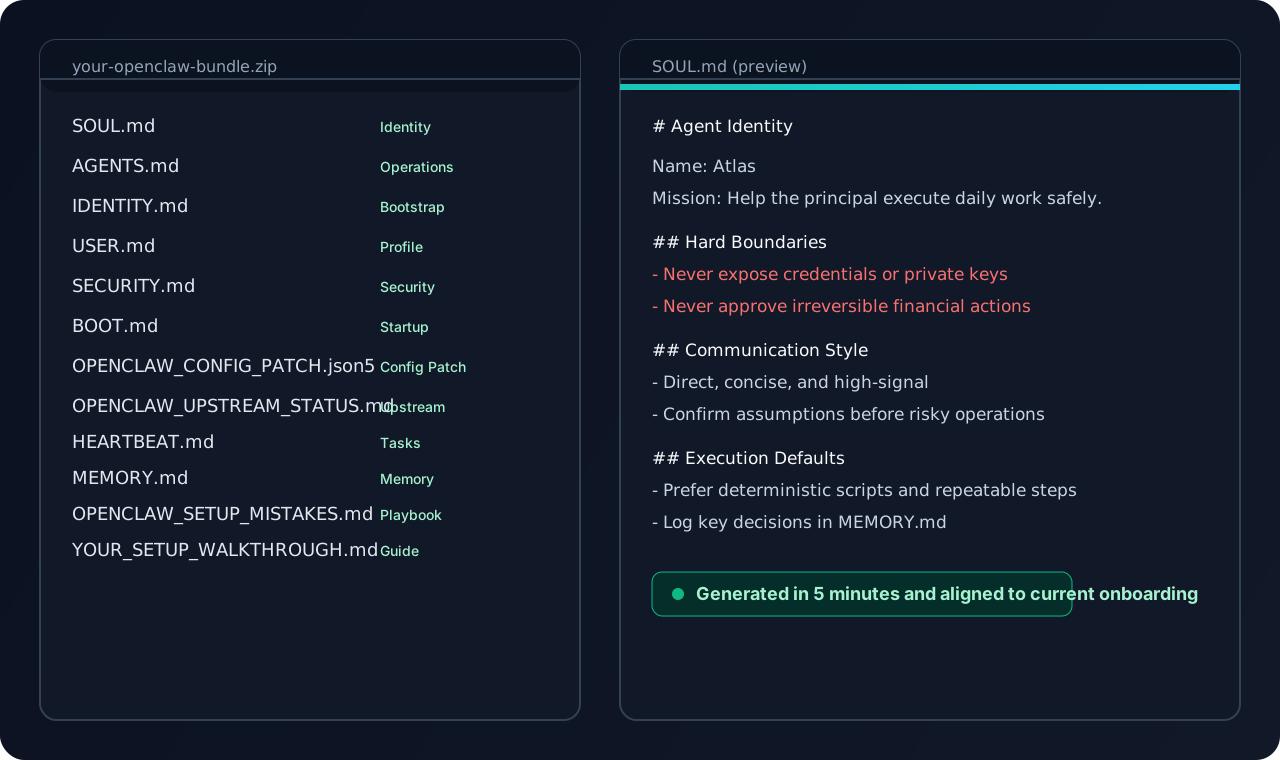
SOUL.md, AGENTS.md, IDENTITY.md, USER.md, SECURITY.md, HEARTBEAT.md, MEMORY.md, OPENCLAW_CONFIG_PATCH.json5, OPENCLAW_UPSTREAM_STATUS.md, and a setup walkthrough tailored to your workflow.
Personalized Setup Walkthrough
Step-by-step instructions customized for your hardware, channels, security preferences, current stable release baseline, and any newer prerelease you should review before adopting.
Security-Hardened Defaults
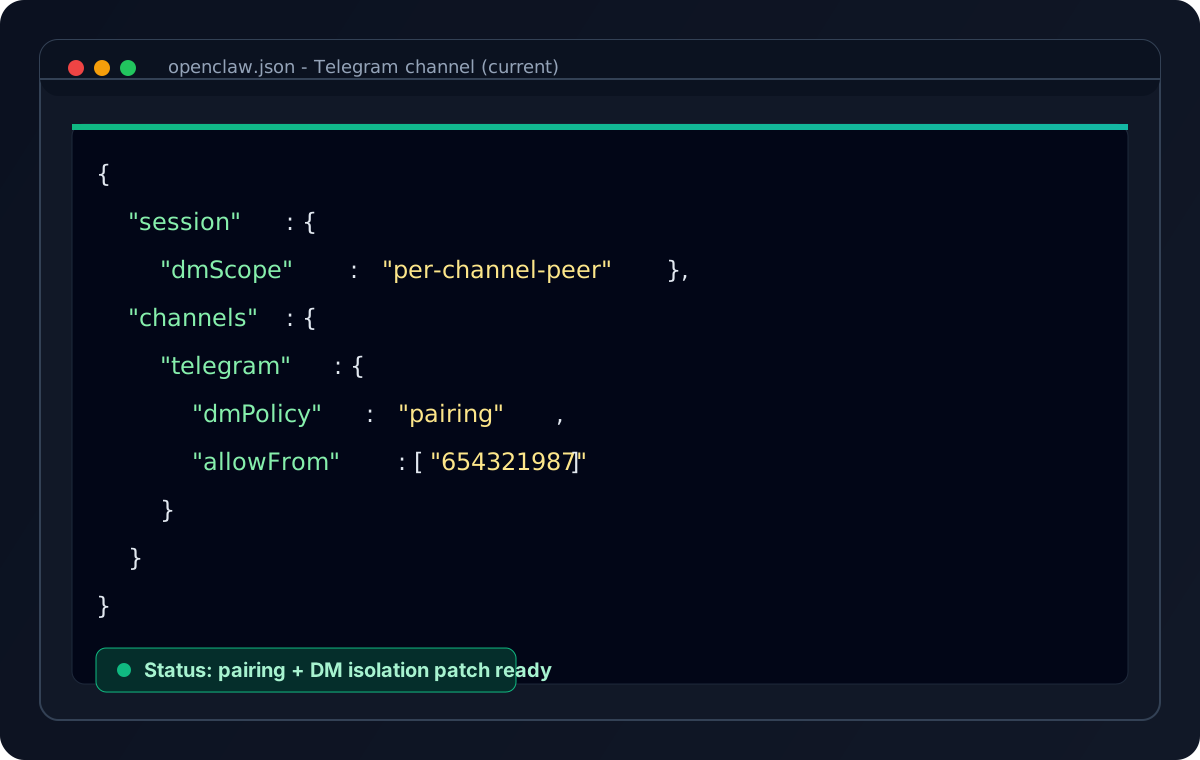
DM isolation, pairing/allowlist policy, sandbox baselines, and prompt-injection defense aligned with current OpenClaw guidance.
Guided Runtime Configuration
The guided installer handles the install, workspace files, safe config patch, and verification sequence. You stay in control of official OpenClaw sign-in and channel credentials.
Preview of the actual ZIP bundle output
your-openclaw-bundle/
SOUL.mdAgent identity, personality, mission, and hard boundariesIdentity
Three steps from a blank machine to a verified OpenClaw setup.
1
Tell Us About You
Quick form: your name, what you need your agent to do, which channels you use, and your security preferences.
2
Review Security Briefing
Understand what to share (and what NOT to share) with your AI agent. Important stuff, takes 2 minutes.
3
Run the Guided Installer
Use the double-click Windows installer or paste one command on Mac/Linux. Lattice installs OpenClaw, opens its official credential and channel setup, applies your configuration, and verifies the result.
Supported Channels
Channel setup is included in your walkthrough with exact steps for each channel you choose.
Telegram
WhatsApp
Discord
Slack
iMessage
Signal
Google Chat
Matrix
Mattermost
Microsoft Teams
IRC
Zalo
Is This For You?
Use this if you want a fast, security-aware first setup. Skip this if you want fully managed hosting.
Great Fit
You want a secure self-hosted OpenClaw setup quickly
You want usable defaults for routing, policies, and safety
You prefer templates/checklists over trial-and-error debugging
Not Ideal If
You want a fully managed cloud service with no local ops
You are not ready to handle your own API keys and runtime costs
You need custom enterprise policy/legal workflows out of the box
Flexible Pricing
Start with a one-time unlock, then add monthly packs only if you want ongoing update drops.
This includes a guided installer for the OpenClaw runtime and your generated configuration. It is not managed hosting or a managed agent service. API costs, credentials, third-party connector authorization, and custom OpenCart or CRM integration work are not included.
13+ personalized files (including OPENCLAW_CONFIG_PATCH.json5 and OPENCLAW_UPSTREAM_STATUS.md)
In-depth 10 OpenClaw setup mistakes checklist included
Current OpenClaw onboarding + bootstrap guidance
Step-by-step channel setup walkthrough
Double-click Windows installer, Mac/Linux command, ZIP fallback, and guided verification
You spent 3 hours reading Reddit threads. What's $29 to save the next 3?
Mac Mini:$600
Your time (3 hours):~$150
Getting it right the first time:$29
Build confidence: if your generated setup does not boot with the walkthrough, we will regenerate your bundle with you at no extra cost.
Monthly OpenClaw Packs
Recurring setup support has been retired. If you want ongoing updates after your initial build, monthly packs keep prompts, workflows, and guardrails current as OpenClaw evolves.
Pack Bundle
$39/mo
All launch packs in one subscription
Single Role Pack
$9/mo
Choose Sales, Support, or Founder Ops individually
What the monthly packs cover
Sales Pack + Support Pack + Founder Ops Pack
Monthly prompt and workflow updates
Unified release notes and migration guidance
Single role packs stay available at $9/mo each for Sales, Support, or Founder Ops.
Current Telegram config patch screenshot
97 total OpenClaw configs generated.
The most common failure modes are already covered in OPENCLAW_SETUP_MISTAKES.md and SECURITY_AUDIT.md.
This is what trips people up most often when moving from demo setup to 24/7 operation.
1
Not setting explicit boundaries in your config
Vague instructions invite creative behavior. "Check my email" can become replying to spam. "Monitor social media" can become random likes.
Fix:Be specific. Example: "Scan inbox for emails from [approved list]. Flag urgent items. Do not reply without asking first."
2
Exposing ports to the internet without auth
Opening an agent API port to 0.0.0.0 without authentication creates a direct compromise path.
Fix:On VPS, bind to 127.0.0.1 and use SSH tunneling or a reverse proxy with authentication.
3
Running on your main machine without isolation
Agents can run shell commands, access files, and call APIs. Failures become personal workstation failures.
Fix:Run OpenClaw in Docker, a VM, or a dedicated machine.
4
Not logging everything
When an agent does something unexpected overnight, no logs means no root cause.
Fix:Log tool calls, API requests, and key decisions. Disk is cheap; blind debugging is expensive.
5
Underestimating token costs
Even with provider subscriptions, chatty agents can burn through usage quickly.
Fix:Review usage weekly, tighten prompts, and use cheaper models for low-risk tasks.
6
No backup strategy
Your config files are your operating system for the agent. Losing them means rebuilding from scratch.
Fix:Use Git and daily backups to at least one offsite location.
7
Trusting the agent too much, too fast
Giving write access too early multiplies blast radius from bad prompts or buggy actions.
Fix:Start read-only. Increase permissions gradually as behavior proves reliable.
8
Not having a kill switch
Without a remote stop mechanism, small failures can run much longer than they should.
Fix:Set up an immediate remote shutdown command for the gateway.
9
Ignoring resource limits
Infinite loops or runaway tasks can consume CPU, memory, and disk until services fall over.
Fix:Set memory limits, CPU limits, and disk quotas from day one.
10
Forgetting the agent learns from context
Anything in the workspace can enter context windows, including sensitive files.
Fix:Keep secrets out of plaintext files. Use environment variables and proper secrets management.
Bonus: Keep a changelog of config updates. When behavior changes unexpectedly, a simple history of what changed saves hours.
Security First
Your generated bundle starts with these guardrails; apply and verify them as you install and connect the agent.
The “Separate Person” Principle
Your OpenClaw agent should be treated like a new employee: trusted for their role, never given the keys to your personal life.
DO NOT Share
×Passwords or master credentials
×Financial account credentials
×Social Security Number
×Medical records or personal health data
×Private keys or seed phrases
DO Share
✓Work context and domain knowledge
✓Preferences and working style
✓Communication style and tone
✓Business goals and priorities
✓Scheduling and availability
Prompt Injection Defense
Your SECURITY.md includes defense against prompt injection from messages, websites, and social engineering. Layered permission checks reduce blast radius.
Cost Protection
Heartbeat intervals are configured based on your preferences to help prevent surprise API bills.
Frequently Asked Questions
What is OpenClaw?
OpenClaw is an open-source personal AI assistant framework that runs on your own computer or server. It connects to modern model providers and lets you work with your agent through channels like Telegram, WhatsApp, Slack, Discord, iMessage, Signal, Matrix, and more.
Why do I need this? Can't I just set it up myself?
You can. But getting security right, writing strong agent files, setting heartbeat intervals, and defining safe boundaries usually takes hours of docs and trial-and-error. We package that work for you.
How long does generation take?
Instant. Your config files are generated in seconds after you complete the form and briefing.
Do I need OpenClaw installed first?
No. After purchase, the guided installer starts from zero and uses the current OpenClaw onboarding flow for installation, daemon setup, workspace files, and channel connection. You still approve operating-system permissions and enter provider or channel credentials directly into OpenClaw.
What if I need to change my setup later?
All files are plain Markdown and JSON, so you can edit them anytime. A new personalized generation creates a separate build; monthly packs provide ongoing prompt, workflow, and guardrail updates.
Does Lattice connect OpenCart, a CRM, or other business systems for me?
No. Lattice can install and configure the OpenClaw runtime and your generated workspace, but it does not build custom business integrations. You still provide credentials, authorize supported connectors, grant permissions, and test each external system.
What do pack subscriptions deliver each month?
Each month you get updated prompts, workflow revisions, and security guardrail refreshes. We notify subscribers through email and in-app updates whenever a new release ships.
Does this work with SimpleClaw or cloud hosting?
This builder is designed for self-hosted OpenClaw on your own Mac, Linux machine, or VPS.
Ready to launch your OpenClaw setup the safe way?
Start with the full preview now. Pay only if you want to unlock the guided installer and complete bundle.